Table of Contents
- Why Low Voltage Cabling Matters for Nonprofits
- Low-Voltage Data Cabling: What It Is and What It Carries
- Structured Cabling for Nonprofits: Building a Foundation That Lasts
- Security Camera Cabling: Clear Footage Starts With the Wire
- Network Cabling Installation Cost: How to Budget Realistically
- Choosing a Low-Voltage Contractor and Evaluating Bids
- Compliance, Documentation, and Continuity of Services
- Frequently Asked Questions
Last Updated: October 18, 2026
Why Low Voltage Cabling Matters for Nonprofits
Low voltage cabling for non profits is the communications wiring that carries data, voice, video, and security signals through your buildings, and it matters because every system your mission depends on runs over it. At Advanced Commercial Communications, we have walked hundreds of facilities where the network was fine on paper and failing in practice.
Here is the uncomfortable truth most guides skip. Nonprofits rarely have a cabling problem. They have a planning problem that shows up as a cabling problem.
The stakes are higher for you than for a typical office. When a clinic’s scheduling system goes down, patients reschedule. When a school’s camera feed is grainy, an incident goes undocumented. When a shelter’s phones fail, families cannot reach anyone.
- Continuity: Donated and grant-funded systems still need wire that works.
- Accountability: Funders increasingly ask how technology dollars were spent.
- Longevity: Good cabling outlives three rounds of equipment upgrades.
- Accessibility: Reliable connectivity is a service, not a luxury.
Below, we break down what low-voltage cabling covers, how to budget without guessing, and how to pick a contractor who will not disappear after the invoice clears.
Low-Voltage Data Cabling: What It Is and What It Carries
Low-voltage data cabling is cabling that carries signals rather than mains power, typically operating under 50 volts, and it includes the twisted pair and fiber-optic cable that connect computers, phones, cameras, and access control. Think of it as the roads. The software is the traffic.
The distinction from standard electrical wiring is straightforward. Electrical wiring delivers power to outlets and fixtures. Low-voltage wiring delivers information. The two share pathways sometimes but never share the same rules, and mixing them up is a common and expensive mistake.
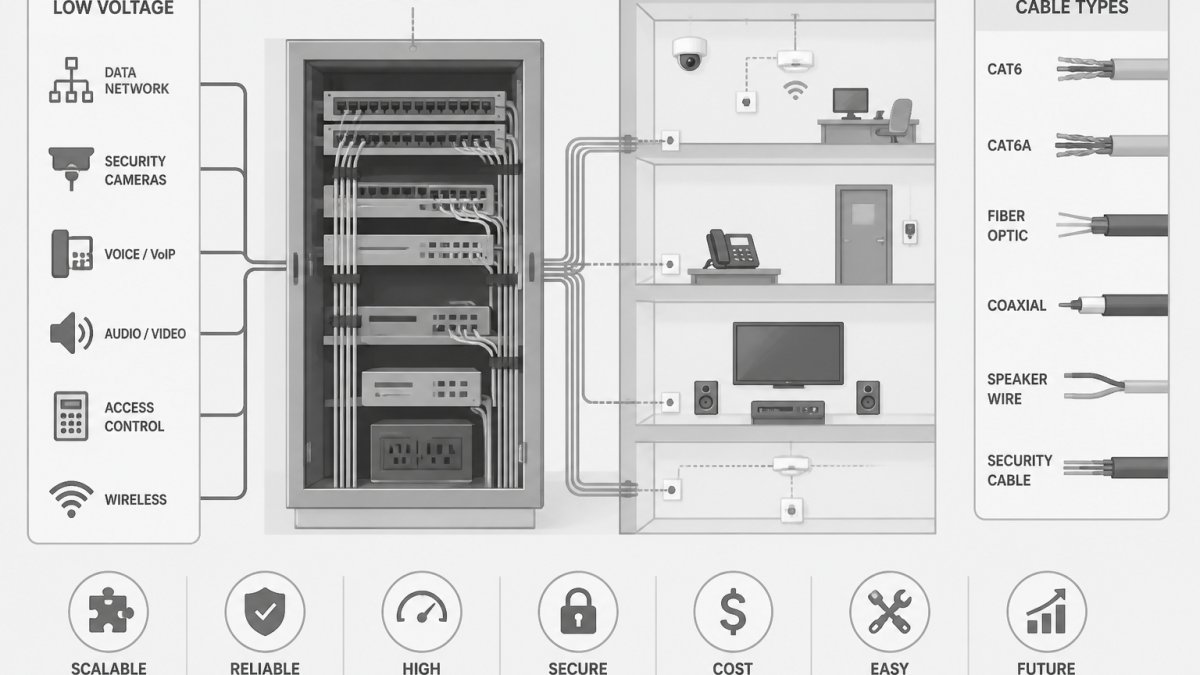
What runs on low-voltage cabling in a typical nonprofit:
- Network and internet connections, including data drops to desks and shared spaces
- VoIP phone systems and paging or mass notification
- Security cameras and access control readers
- Audio visual systems in board rooms and community halls
- Wi-Fi access points and, in larger facilities, fiber-optic network backbones
A frequent error we see is treating all of this as one project. It is not. Each system has its own cable type, connector, and termination standard. The camera on your loading dock may need a different cable than the printer at the front desk.
Ask your contractor to map every system to a specific cable type and jack before installation begins. A one-page system-to-cable matrix prevents the “we ran out of the right wire” conversation halfway through a grant-funded build.
Certified cable and manufacturer specifications matter here. Cheap cable that misses spec will pass a quick test and fail in two years.
Structured Cabling for Nonprofits: Building a Foundation That Lasts
Structured cabling for nonprofits is the practice of organizing all communications wiring into one planned, labeled, testable system, and it is the single best defense against costly rework.
The core idea is simple. Every cable terminates in a known place, gets tested, gets labeled, and gets documented. Sounds obvious. It almost never happens in buildings that grew organically.
The components of a structured cabling system:
- Horizontal cabling: runs from a work area to the nearest telecommunications room
- Backbone cabling: connects telecommunications rooms to each other and to the main equipment room
- Telecommunications rooms: the closets where cable terminates and equipment lives
- Cable management: trays, rings, and panels that keep runs organized and serviceable
- Labeling and documentation: the record that makes future work possible
For a nonprofit with multiple sites, this structure pays off fastest. A clinic that adds a second location can replicate a documented design instead of reinventing it. A school district can compare buildings on the same standard.
The thing nobody tells you about structured cabling is that the closets matter more than the runs. A messy closet full of unlabeled cable turns a simple phone repair into a half-day hunt.
Scalability belongs in this conversation too. Pull two cables where you need one. The labor cost is nearly identical, and the second cable is there when you add a camera or a printer.
Security Camera Cabling: Clear Footage Starts With the Wire
Security camera cabling determines whether your footage is usable, and no camera upgrade fixes bad wire. That is the part most buyers learn too late. A high-resolution camera on an undersized or poorly terminated cable produces the same grainy, unusable video as a cheap camera.
Nonprofits face a particular squeeze here. Cameras protect staff, clients, and property, but budgets are tight and boards ask hard questions about spending. The answer is not to buy the cheapest system. It is to get the cabling right so the cameras you can afford actually perform.
What separates usable footage from useless footage:
- Cable that meets the camera’s power and bandwidth needs over the full run length
- Proper termination at both ends, tested and documented
- Cable routing that avoids interference from electrical lines and equipment
- Protection for runs that pass through harsh environments or outdoors
IP rating matters for any camera or connection exposed to weather or washdown. A camera housing rated for outdoor conditions protects the camera. It does nothing for a poorly sealed connector behind it.
We hear a version of this concern constantly: “Our last vendor promised better cameras and the footage is still grainy.” The camera was rarely the problem. The cable, the connector, or the pathway was.
Running camera cable alongside electrical lines is one of the most common installation mistakes we find. It introduces interference that shows up as flickering, dropped frames, or noise. The fix usually means rerouting cable, which costs far more than doing it right the first time.
For facilities with existing analog systems, plan the transition carefully. Mixed environments work, but only when documented.
Network Cabling Installation Cost: How to Budget Realistically
Network cabling installation cost depends on cable type, drop count, pathway difficulty, labor, testing, and contingency, so any single per-drop figure you hear is a starting point at best. We will not hand you a number we cannot stand behind.
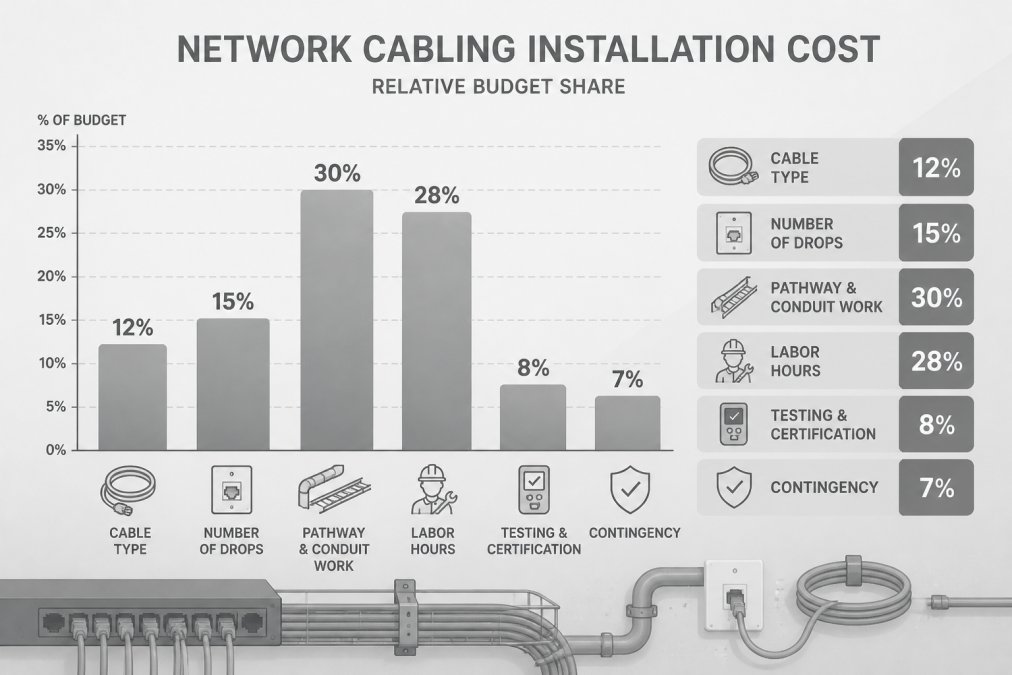
What we can give you is the structure of a realistic budget. Most nonprofit cabling projects go sideways because the budget covers cable and labor and forgets everything else.
The cost drivers that actually move your number:
| Cost Driver | What Drives It | Budget Impact |
|---|---|---|
| Cable type | Copper vs. fiber, category rating | Higher for fiber and higher categories |
| Number of drops | Total work areas served | Scales roughly with count |
| Pathway and conduit | Open ceiling vs. finished walls, conduit needed | Highest variance of any line item |
| Labor hours | Building access, ceiling height, after-hours work | Rises with complexity and scheduling constraints |
| Testing and certification | Required test reports and labeling | Small but non-negotiable |
| Contingency | Unknown conditions behind walls | Reserve a meaningful share |
Two budget habits separate smooth projects from painful ones.
First, budget for pathways separately. Opening a finished wall costs more than pulling cable through an open ceiling, and no honest contractor can tell you which you have until they see it.
Second, fund a contingency line. Older buildings hide surprises. A budget with no room for the unexpected becomes a change order.
The cheapest bid is rarely the cheapest project. A low number usually means pathways, testing, or documentation were left out, and those costs return as change orders once work starts.
For grant-funded work, ask your contractor for a scope broken down by these drivers. Funders respond well to line-item clarity, and it protects you if the project scope shifts.
Choosing a Low-Voltage Contractor and Evaluating Bids
Choosing a low-voltage contractor comes down to four things: documented scope, testing and closeout practices, post-installation support, and whether the bid reflects reality. A low-voltage specialist should be able to explain all four without hedging.
Start with the site walk. A contractor who quotes from a phone call is guessing.
What to ask every bidder:
- Can you provide a scope that lists cable types, drop counts, and pathway assumptions?
- Will you deliver test results and as-built documentation at closeout?
- What does support look like after the project ends, and how do we reach you?
- Who actually performs the work, your employees or subcontractors?
- Can you show experience with facilities like ours?
- How do you handle change orders, and what triggers one?
That last question separates professionals from order-takers. Change orders are normal. Surprise change orders are a sign the original bid was incomplete.
The “they disappeared after the install” story is the most common complaint we hear about previous vendors. Ask directly what happens if something fails in month six. Get it in writing.
For multi-site organizations, ask about scale. A contractor who handles one building well may not have the crew or the process for five. Ask how they schedule across sites and who coordinates.
Nonprofits with tight budgets and older buildings who need a contractor willing to walk the site, scope honestly, and phase the work across budget cycles.
Compliance, Documentation, and Continuity of Services
Compliance and documentation are what let a nonprofit prove the work was done right and keep services running when staff change. Cabling is invisible until it fails, which is exactly why the paper trail matters.
Start with the standards that govern the work. For organizations handling protected health information, network design also intersects with HIPAA security guidance from HHS, and for schools, FCC guidance on cybersecurity for schools and libraries is worth reviewing before you sign off on a design.
Documentation you should receive at closeout:
- As-built drawings showing cable routes and termination points
- Test reports for every cable run
- Labeling schedules that match the physical labels in your closets
- Warranty terms and manufacturer certification details
- A contact for support and a stated response expectation
Continuity of services deserves its own plan. Ask what happens during installation. Can the clinic keep its phones? Can the front desk keep processing donations?
For organizations with public-facing services, plan cutovers around your calendar. Never schedule a phone system cutover the week of a major fundraiser.
We recommend keeping a simple technology binder, physical or digital, with all of this in one place. When your IT volunteer rotates out or your operations manager retires, the binder is what keeps the next person from starting over.
Nonprofit technology budgets are tight, timelines are real, and the cost of getting cabling wrong lands on the people you serve. Our teams handle structured cabling, fiber optics, security camera systems, paging and mass notification, and managed IT, with a focus on quality installation and solutions that fit your actual budget.
Frequently Asked Questions
What low-voltage cabling does a nonprofit need?
Most nonprofits need a structured cabling backbone of Category 6 or 6A twisted pair for workstations, phones, and Wi-Fi access points, plus fiber-optic cable between buildings or floors where runs exceed copper limits. Add dedicated cabling for security cameras, access control, and paging or mass notification if you operate those systems. The right mix depends on your building layout, device count, and whether you serve the public on site. A free site walk is the fastest way to size it accurately before you budget.
How should a nonprofit plan low voltage cabling on a limited budget?
Separate must-have from nice-to-have. Cable the core areas first: main office, public-facing desks, and camera locations covering entrances and cash or records areas. Install conduit and pathways with spare capacity so future drops cost less to add. Ask contractors for itemized bids so you can compare labor, materials, and testing line by line, and request a phased plan. Pricing depends on drop count, building conditions, and cable type, so get a quote rather than relying on rough rules of thumb.
How far can Ethernet cable run before performance is affected?
Copper twisted pair Ethernet is generally limited to about 100 meters (roughly 328 feet) per run, including patch cords, for standard data rates. Beyond that, signal degradation and speed drops become likely, and you should plan a fiber-optic uplink or an intermediate telecom room instead. Camera runs and PoE devices follow similar distance limits, with power loss increasing on longer runs. Ask your installer to document run lengths and test results so you know which segments are near the limit.
Can network cabling support security cameras and access control?
Yes. Modern IP cameras and many access control readers run on Power over Ethernet, so a single twisted pair cable carries both data and power. That simplifies installation and keeps camera and door hardware on the same structured cabling system as your network. Plan separate VLANs or dedicated switch ports for security devices so camera traffic does not compete with staff systems, and confirm your switch power budget covers every device. Good security camera cabling also means protected pathways and labeled terminations for easier maintenance.