Table of Contents
- What Managed IT Support Covers for Nonprofits
- Nonprofit IT Support Costs: What Drives Your Monthly Bill
- Benefits of Managed IT for Mission-Focused Operations
- Nonprofit IT Provider Checklist: 10 Questions Before You Sign
- Building a Nonprofit IT Transition Plan
- Common Mistakes Nonprofits Make With Managed IT
- Frequently Asked Questions
Last Updated: October 9, 2026
What Managed IT Support Covers for Nonprofits
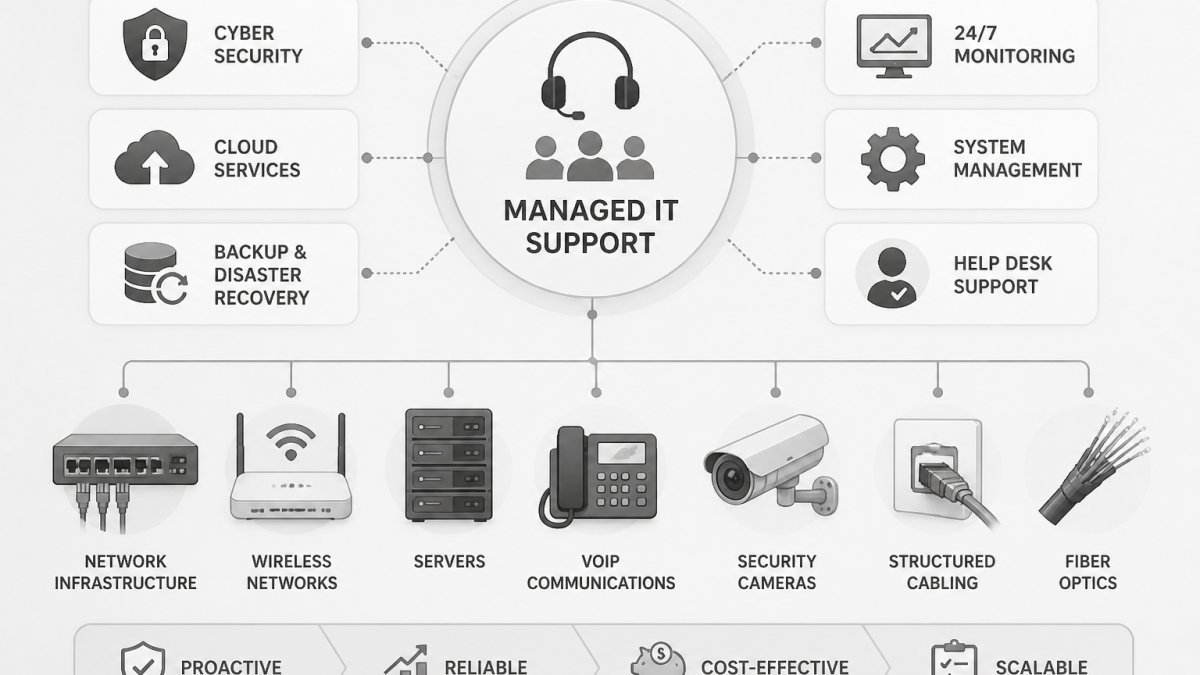
Managed IT support for nonprofits is a subscription service where an outside provider monitors, maintains, and secures your computers, network, and cloud accounts for a predictable monthly fee. Coverage breaks down into help desk, monitoring, and maintenance, backed by backup and donor data protection.
Managed IT support hands that work to a provider whose only job is keeping your systems running.
Core Services: Help Desk, Monitoring, and Maintenance
The help desk is the service your staff and volunteers actually notice. When a laptop won’t connect or a shared drive disappears, they open a ticket and get a person, not a voicemail.
Behind the scenes, monitoring tools watch servers, network gear, and endpoints for failing drives, full storage, and unusual login activity. Proactive maintenance follows: patch management pushes security updates, firmware gets applied, and backups get tested before you need them.
- Help desk and user support: tickets, remote troubleshooting, and on-site visits when hardware fails
- System monitoring: alerts for downtime, capacity, and security events
- Proactive maintenance: patching, updates, and hardware lifecycle planning
Ask any provider how they document a ticket from open to close. If they can’t show you a sample report, you have no way to verify resolution time later.
Security, Backup, and Donor Data Protection
Donor data is your most valuable digital asset and deserves the same protection as a bank account.
A common mistake is treating backup as a checkbox. Backup without a restore test is a guess. Business continuity planning should include how fast you can get donor records back and who has authority to make that call.
CISA’s guidance on nonprofit and small business cybersecurity outlines basic steps that map cleanly onto a managed service agreement: multi-factor authentication, patching, and offline backups.
Nonprofit IT Support Costs: What Drives Your Monthly Bill
Nonprofit IT support costs come down to four variables: how many people you support, how many devices they use, how much security and compliance work your funding requires, and how much of your stack lives in the cloud. A reputable provider quotes after a site walk rather than publishing a flat rate.
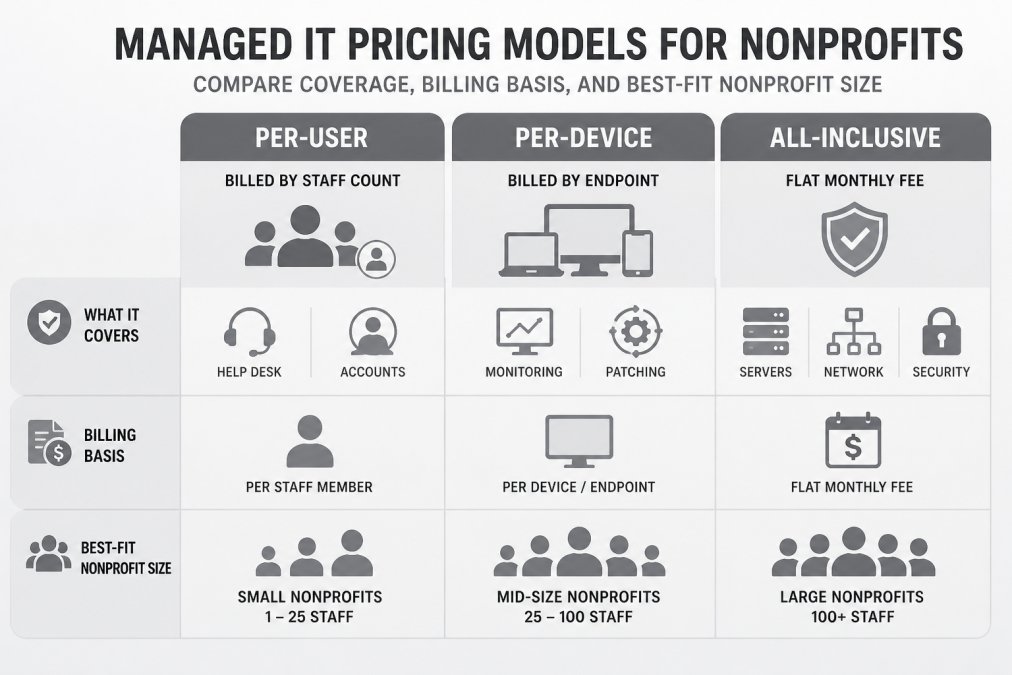
A common pattern is a per-user monthly rate bundling help desk, monitoring, patching, and endpoint security, with servers, network gear, and projects billed separately. Others fold everything into an all-inclusive flat fee. Neither is inherently cheaper, the question is which matches how your organization operates.
What Actually Drives Your Monthly Bill
Four cost drivers explain most of the variance between quotes:
- User count. Every staff and volunteer account needing help desk access, email, and file permissions adds to the per-user line. Ask how the provider bills for seasonal accounts active only three months a year.
- Device count and type. Laptops and desktops are the baseline. Servers, switches, firewalls, and cameras often carry separate monitoring fees because they require different tooling and expertise.
- Security and compliance scope. If you accept card payments, handle grant data under a funder agreement, or store protected health information, your provider needs extra controls: access reviews, logging, encryption verification, and documented retention rules.
Per-User vs. Per-Device vs. All-Inclusive Pricing Models
Each pricing model shifts risk differently. Per-user pricing scales with headcount, suiting organizations with steady staff and shared devices. Per-device pricing tracks endpoints, fitting clinics or facilities where equipment outnumbers people.
| Model | Billed By | Best For | Watch Out For |
|---|---|---|---|
| Per-user | Staff and volunteer accounts | Office-based teams, stable headcount | Shared kiosks counted twice; seasonal volunteers billed year-round |
| Per-device | Laptops, desktops, servers | Clinics, labs, device-heavy sites | Servers billed separately; cloud-only users may be under-covered |
| All-inclusive | Flat monthly fee | Multi-site organizations | Scope limits buried in fine print; project work excluded |
All-inclusive pricing gives the most predictable IT costs, but only if the agreement spells out exclusions. Ask directly: are servers, network gear, and cameras inside the flat fee or billed as projects?
Total Cost of Ownership vs. Break-Fix IT
Break-fix IT looks cheaper until something breaks. You pay by the hour, wait for availability, and absorb downtime while your team sits idle.
Add up last year’s break-fix invoices, the staff hours lost to downtime at your average hourly program cost, and any emergency hardware replacements. Most organizations find the true number is 30% to 50% higher than the invoices alone suggest.
Comparing Managed Services with Internal Staffing
A single IT generalist on payroll carries salary, benefits, training, and coverage gaps during vacation or turnover. A managed provider spreads those costs across a team with specialized skills, network, security, cloud, and help desk, for a fraction of a full-time hire in most markets.
A hybrid model works well for mid-sized nonprofits: one internal IT coordinator owning vendor relationships, policy, and staff training, backed by a managed provider for monitoring, patching, security, and after-hours support.
Compare quotes on total cost of ownership, not monthly sticker price. A lower monthly fee with hourly project charges often costs more over twelve months. Build a simple spreadsheet: monthly fee, expected project hours, after-hours incidents, and staff downtime cost. The lowest total wins.
Benefits of Managed IT for Mission-Focused Operations
The clearest benefit of managed IT for nonprofits is that program staff stop being de facto IT staff. Caseworkers, teachers, and volunteer coordinators spend their hours on mission work rather than resetting passwords.
Predictable IT costs help with budgeting and grant reporting. Reduced downtime keeps donor portals, intake forms, and phone systems available.
Staff productivity gains show up in small places. That’s where a broader Managed IT Services arrangement earns its keep, pairing day-to-day support with the Network Infrastructure your programs depend on, so connectivity and coverage scale as you grow.
TechSoup’s nonprofit technology resources is a useful reference for organizations weighing donated software against paid support.
Nonprofit IT Provider Checklist: 10 Questions Before You Sign
A nonprofit IT provider checklist keeps the sales conversation honest. Ask these ten questions before you sign anything, and get the answers in the contract, not just the pitch.
- What is your guaranteed response time, and is it in the service-level agreement?
- How do you measure and report system uptime?
- Who handles after-hours emergencies, and what does that cost?
- How do you manage patch management and security updates?
- What does your backup and recovery plan include, and when was it last tested?
- How do you handle access controls when staff or volunteers leave?
- Are servers, network gear, and cameras inside the monthly fee?
- What are your onboarding and offboarding procedures for user accounts?
- Can you support multiple sites and remote volunteers?
- What happens at the end of the contract if we leave?
Service-Level Criteria to Demand in Writing
A service-level agreement (SLA) is only useful if it defines measurable commitments. Ask for these metrics in writing, with remedies if missed:
- Response time: How long until a human acknowledges a ticket? Typical targets are 15 to 30 minutes for urgent issues and 2 to 4 hours for standard requests during business hours.
- Resolution time: How long until the issue is fixed or a workaround is in place? Urgent issues should resolve within 4 hours; standard issues within one business day.
- Uptime guarantee: What percentage of monitored systems will be available? 99.9% is a common baseline for business-critical systems.
If a provider resists putting these numbers in the contract, that is your answer.
Onboarding and Transition Plan
A clean transition follows a predictable sequence. Ask the provider to walk you through each step before signing:
- Discovery and asset inventory. The provider documents every laptop, server, switch, printer, phone, and camera, plus every cloud account and software license, and delivers the inventory to you.
- Access and credential handoff. The provider receives administrative access through a secure process, and you retain ownership of all credentials. Never let a provider hold sole control of your domain or donor database.
- Monitoring and backup deployment. Agents are installed, backups are configured, and a restore test is scheduled before any other changes.
- Staged cutover. Go-live happens by location or department so one problem doesn’t take down every site at once.
- First 30 days of tuning. Alert thresholds are adjusted, stale accounts are closed, and the help desk reachability is confirmed with your staff.
- Exit plan. The contract should specify how you retrieve your data, credentials, and documentation if you leave. A provider who cannot describe an orderly exit is a provider who plans to hold you.
Signing without a written service-level agreement is the most expensive mistake nonprofits make. Without defined response and resolution times, you have no recourse when a ticket sits for three days. Equally dangerous is a contract with no exit clause, you can end up locked into a provider with no way to retrieve your own data.
Measuring Performance After Go-Live
Selection is not the end of the process. Review these key performance indicators quarterly with your provider:
- Average response time and average resolution time by ticket priority
- Uptime for critical systems, reported monthly
- Patch compliance percentage across all endpoints
If the provider cannot produce these numbers, you cannot tell whether the service is working. Ask for a sample monthly report during the sales process, before you sign.
CISA’s guidance on nonprofit and small business cybersecurity outlines basic steps that map cleanly onto a managed service agreement: multi-factor authentication, patching, and offline backups.
Building a Nonprofit IT Transition Plan
A nonprofit IT transition plan moves you from your current setup to managed support without disrupting programs. Done well, staff notice almost nothing except faster fixes. Done badly, you lose a week of productivity and goodwill.
Phase 1: Discovery and Asset Inventory
Discovery starts with a full asset inventory: every laptop, server, switch, printer, phone, and camera, plus every cloud account and software license. This phase documents what’s in warranty, what’s end-of-life, and what nobody can find the password for.
This phase also maps your data: where donor records live and who can access grant files and payment information. That map becomes the basis for access controls and data governance.
Phase 2: Migration, Testing, and Go-Live
Migration and testing come next. Accounts are moved, monitoring agents are deployed, and backups are confirmed to run before anything else changes. Testing includes a restore drill, because a backup you’ve never restored isn’t a backup.
Go-live is staged by location or department so one problem doesn’t take down every site at once. The first thirty days are about tuning: adjusting alert thresholds, closing stale accounts, and confirming the help desk is reachable.
Common Mistakes Nonprofits Make With Managed IT
The most common mistake is buying on price alone. A provider who underbids to win the contract often cuts monitoring depth or response time to protect margin, and you feel it in month three.
Other recurring errors:
- No asset inventory before signing. You can’t scope support for uncatalogued equipment.
- Treating donor data governance as an afterthought. Grant and payment data need documented access rules, not shared logins.
- Skipping the transition plan. Switching providers without a phased cutover invites downtime.
FCC guidance on cybersecurity for small organizations reinforces that basic hygiene, not expensive tooling, prevents most incidents.
Nonprofit technology rarely fails all at once; it erodes through small gaps nobody owns.
Frequently Asked Questions
What does managed IT support include for nonprofits?
Most managed IT support plans cover help desk and user support, system monitoring, proactive maintenance, patch management, network support, and backup and recovery. Security monitoring, access controls, and incident response are often included or available as add-ons. For nonprofits, the plan should also address donor data protection, fundraising technology, and communications tools. Ask any provider to list exactly what is covered, what costs extra, and what response time you get under the service-level agreement before you sign.
How much does managed IT support cost for a nonprofit?
Nonprofit IT support costs depend on your user count, device count, number of locations, and how much security and compliance coverage you need. Pricing models vary: per-user, per-device, or all-inclusive bundles. Rather than quote a flat figure, a provider should walk your site, inventory your infrastructure, and build a proposal around your actual budget. Request a free site walk and written quote so you can compare total cost of ownership against your current break-fix spending.
How can a nonprofit choose the right managed IT provider?
Use a nonprofit IT provider checklist: confirm experience with nonprofits and grant-funded environments, ask about response and resolution time guarantees, verify backup and disaster recovery testing, and check references from similar-sized organizations. Ask how they handle donor data governance and whether they support your donor management systems and collaboration tools. Get the service-level agreement in writing, and confirm what happens after installation if something breaks. A provider that answers these clearly is worth a second meeting.
What should a nonprofit include in an IT transition plan?
A nonprofit IT transition plan should start with discovery: inventory every device, server, network component, and software license. Next, document credentials, vendor contracts, and data flows, especially donor and payment data. Set a migration schedule with testing milestones, assign an internal point of contact, and agree on a go-live date with a rollback option. Include staff training and a 30-day post-transition review. Build the plan with your managed service provider so nothing falls through the cracks during the switch.