
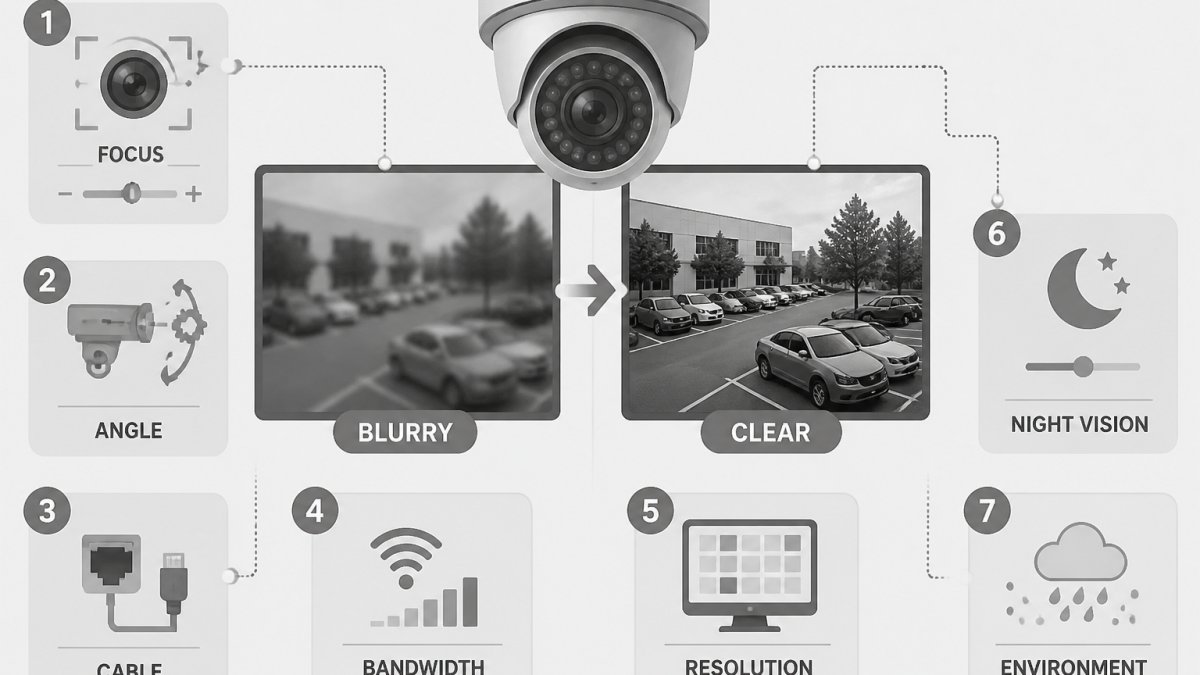
Table of Contents
- Start With a Symptom Check Before You Touch Anything
- How to Fix a Blurry Security Camera: A Step-by-Step Walkthrough
- Security Camera Lens Cleaning Without Scratching the Optics
- Security Camera Focus Adjustment: Manual, Autofocus, and Varifocal Lenses
- Why Your Security Camera Is Blurry at Night
- Resolution, Wide-Angle Lenses, and Distance: When Detail Is Already Gone
- Moisture, Condensation, and Weather Exposure
- Network, Recording, and Playback Quality: The Blur Nobody Checks
- When to Clean, Adjust, Repair, or Replace
- Frequently Asked Questions
Last Updated: October 19, 2026
Start With a Symptom Check Before You Touch Anything
Understanding why your security cameras are blurry almost always comes down to one of five causes: a dirty lens, bad focus, low resolution, night-time infrared glare, or a network and recording problem.
Here’s the thing most guides get wrong: they treat every blur as a hardware fault. It usually isn’t. A camera that looks soft on your phone app may be recording perfectly. A camera that’s sharp in daylight may fall apart after dark.
Is the Blur Constant, Nighttime-Only, or Intermittent?
Answer that question first. It narrows the cause from five possibilities to one or two.
- Constant blur, day and night: dirty lens, wrong focus, or a resolution and distance problem
- Nighttime-only blur: infrared glare, reflections, or weak low-light performance
- Intermittent blur: network drops, recording settings, or a loose connection
- One camera only: almost always physical (lens, housing, aim)
- Every camera at once: almost always the recorder, network, or app
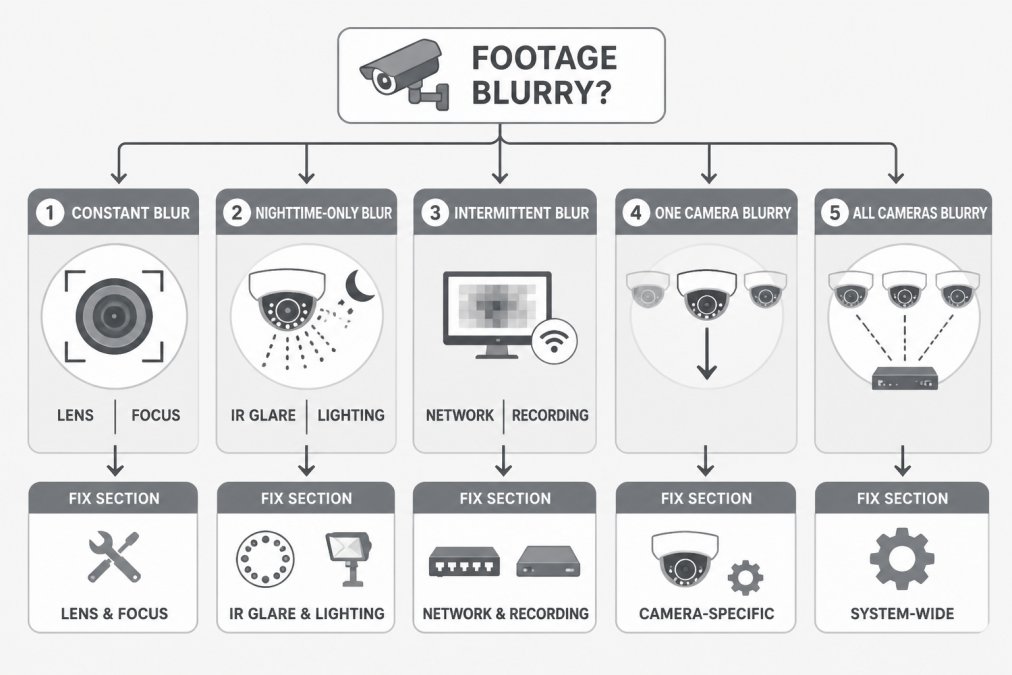
That single check saves hours. If all cameras are soft, don’t clean anything. Go straight to the recorder and network.
Before you touch a single camera, pull up the same clip on the recorder itself. If it looks sharp there and blurry in the app, you have a streaming problem, not a camera problem. That distinction changes everything you do next.
How to Fix a Blurry Security Camera: A Step-by-Step Walkthrough
Work through these steps in order. Stop as soon as the image clears up.
- Check the feed on the recorder, not the app
- Inspect the lens, dome, or cover for dirt, smudges, or scratches
- Clean the optics with the right materials
- Check focus and adjust if the camera allows it
- Review image settings for resolution and sharpness
- Test at night to catch infrared glare
- Check network and recording quality if the blur is intermittent
Step 1: Check the Feed on the Recorder, Not Just the App
The recorder is the source of truth. Open the live view and a recorded clip directly on the NVR or DVR. If the recorder image is sharp but the phone app looks soft, the camera is fine.
This is the step nobody checks. Phone apps often downscale video to save data, especially on cellular. A camera can look terrible on your phone and record crisp footage all day.
Step 2: Inspect and Clean the Lens, Dome, or Cover
Look at the camera housing in daylight. Check for dust, spider webs, water spots, and fine scratches. Dome cameras are the usual suspects. The clear bubble collects dust on the outside and haze on the inside, and both soften the image.
- Check the outer surface of the dome or lens
- Look for condensation or fog inside the housing
- Check for scratches and crazing on older plastic domes
- Inspect nearby foliage, signage, or fixtures blocking part of the view
A dirty lens is the most common cause of a blurry image, and it’s the cheapest to fix. But clean it properly, or you’ll make it worse.
Security Camera Lens Cleaning Without Scratching the Optics
Clean optics with a soft microfiber cloth and a lens-safe solution, never a paper towel or a dry shirttail. Paper products and rough fabric leave micro-scratches that permanently soften the image. Once a plastic dome is scratched, no amount of cleaning brings the detail back.
Here’s how to do it:
- Power down or cover the camera so you can see the surface clearly
- Blow off loose dust first with a bulb blower or canned air held at a distance
- Wipe gently in a circular motion with a clean microfiber cloth
- Use a lens cleaning solution for smudges, never household glass cleaner
- Dry with a second clean cloth to avoid streaks
- Check the inside of the dome if the haze persists
Never spray cleaner directly onto the lens or dome. Liquid seeps into the housing, and trapped moisture fogs the optics from the inside. That turns a five-minute cleaning into a camera replacement.
For outdoor units, a quick monthly wipe can be added to a maintenance routine. A camera under a tree collects pollen and spider webs fast, and both scatter light in ways that look exactly like a focus problem.
Security Camera Focus Adjustment: Manual, Autofocus, and Varifocal Lenses
Focus adjustment depends on the lens type. Fixed-lens cameras have no focus control, so a soft image means cleaning, repositioning, or replacing the unit. Manual and varifocal lenses let you dial in sharpness directly.
- Fixed lens: no adjustment. Clean it, check the aim, or replace it.
- Manual focus: turn the focus ring on the lens body until edges and text are crisp
- Varifocal lens: zoom to your desired field of view first, then focus
- Autofocus: trigger a re-focus in the camera settings and confirm it locks on a distant object
A common mistake is focusing at the wrong distance. Focus on something far away, not the fence two feet from the lens. And if you adjust a varifocal lens, always zoom before you focus. Doing it in the wrong order leaves the whole scene soft.
Why Your Security Camera Is Blurry at Night
If you’re wondering why your security cameras are blurry at night, it usually points to infrared glare or weak low-light performance, not a dirty lens. The camera switches to infrared LEDs after dark, and those LEDs bounce off anything close to the lens. The result is a washed-out, hazy image with a bright halo.
IR Glare, Reflections, and the IR Cut Filter
Infrared glare happens when IR light reflects off a nearby surface back into the lens. Common culprits:
- A wall, soffit, or eave within a foot or two of the camera
- Rain droplets or dust on the dome scattering the IR light
- A dirty or foggy dome that traps the reflection
- An IR cut filter that’s stuck, leaving colors wrong and contrast flat
Move the camera or tilt it away from the reflective surface. Clean the dome. If the image stays hazy with a pink or purple tint, the IR cut filter may be failing, and that’s a repair or replacement decision. Nighttime blur that vanishes by day is almost always an IR or lighting issue, not a lens defect.
If the blur only shows up after dark, stop cleaning and start looking at what’s near the lens. Infrared reflections cause more night-time complaints than dirty glass ever does.
Resolution, Wide-Angle Lenses, and Distance: When Detail Is Already Gone
Sometimes the detail was never there. A low-resolution camera, a very wide-angle lens, or too much viewing distance means the pixels you need simply don’t exist.
A wide-angle lens spreads a fixed pixel count across a huge field of view. The wider the view, the fewer pixels land on any one face or license plate. Digital zoom makes it worse.
- Match resolution to the job: identify faces and plates up close, watch wide areas from afar
- Keep the subject within a reasonable viewing distance for the lens
- Avoid digital zoom for identification; it adds no real detail
- Add a second, tighter camera instead of stretching one wide shot
If identification matters, the fix is a closer camera or a narrower field of view, not more zoom.
Moisture, Condensation, and Weather Exposure
Condensation fogs the lens from the inside, and it looks identical to a dirty lens from a distance. Moisture builds up when a housing seal fails, when temperature swings sharply, or when a dome wasn’t sealed properly at install.
Signs to look for:
- Fog or droplets visible inside the dome
- Water spots that don’t wipe off the outside
- Image that clears as the day warms up, then fogs again at night
- Rust or corrosion around the housing seals
A foggy lens needs the housing opened, dried, and resealed, or the camera replaced if water has reached the electronics. Proper sealing at installation prevents most of this.
Network, Recording, and Playback Quality: The Blur Nobody Checks
The blur nobody checks is the one in the pipeline, not the camera. Network drops, low recording bitrates, and playback settings can all make sharp footage look soft.
Look at these:
- Recording resolution and bitrate: set too low, and detail is thrown away before it’s saved
- Network bandwidth: a congested switch or bad cable causes dropped frames and smearing
- Playback settings: some viewers downscale on export or remote playback
- Storage health: a failing drive can corrupt frames and cause stutter
This is where a managed approach pays off. Our Security Camera Systems service can include the network and recording side, not just the cameras, so footage stays clear from lens to playback. If your cameras look fine live but blurry in recordings, the Network Infrastructure underneath them deserves a look.
Compare a live snapshot with the same moment in a recorded clip. If they differ in sharpness, the camera is innocent. Your recorder settings or network are eating the detail.
When to Clean, Adjust, Repair, or Replace
Match the fix to the symptom and stop guessing. This table summarizes what we covered so you can act fast.
| Symptom | Likely Cause | First Fix | When to Replace |
|---|---|---|---|
| Blurry day and night, one camera | Dirty lens or dome | Clean the optics | Scratched or crazed dome |
| Soft edges, wrong distance | Focus or aim | Refocus, reposition | Fixed lens that can’t focus |
| Blurry only at night | IR glare or reflections | Move or tilt the camera | Failing IR cut filter |
| Fog or droplets inside | Seal failure, condensation | Dry and reseal | Water reached electronics |
| All cameras soft | Network or recorder | Check bitrate and bandwidth | Failing recorder or drive |
| Blurry in app, sharp on recorder | Streaming or bandwidth | Check app and network | Not usually needed |
If you’ve cleaned, refocused, and checked the recorder and the image is still soft, it’s time for a professional look.
Blurry footage rarely means you need a whole new system. Our veteran-owned team handles security camera systems, network infrastructure, and managed IT, with free site walks and consultations tailored to your facility and budget.
Frequently Asked Questions
Why is my security camera footage blurry?
Most blurry security camera footage traces back to one of a few causes: a dirty lens or dome cover, incorrect focus, low resolution or image settings, condensation inside the housing, or infrared glare at night. Before buying anything new, check the feed on the recorder itself, clean the lens with a microfiber cloth, and confirm the camera is focused on the area you actually need to identify people in. If only the night view is soft, the problem is usually IR reflection or lighting, not the camera’s resolution.
Can a dirty camera lens make footage look blurry?
Yes, and it is the most common cause of a soft image. Dust, pollen, spider webs, and water spots on the lens or dome cover scatter light and cut sharpness, especially when infrared LEDs are on. Clean the lens and dome with a microfiber cloth and a lens-safe solution, never a paper towel or abrasive cleaner. On outdoor domes, also check the foam ring and housing seal, since a missing or worn seal lets moisture and debris onto the optics.
Why is my security camera blurry at night but clear during the day?
Nighttime-only blur usually comes from infrared illumination. IR light bouncing off a nearby wall, soffit, gutter, or the camera’s own housing creates glare that washes out the image. Move the camera or adjust its angle so IR light is not reflecting back into the lens, clean the dome cover, and confirm the IR cut filter is switching correctly. If the scene is simply too dark, add external lighting rather than relying on digital zoom, which only enlarges pixels and makes the blur worse.
When should I replace a security camera that keeps producing blurry footage?
Replace the camera when you have cleaned the lens, corrected the focus, fixed glare and lighting, and confirmed the recorder and network are not the cause, and the image is still soft. Also replace units with failing IR LEDs, a scratched or clouded dome that will not clear, or a sensor that no longer resolves faces at the distances you need. For multi-site facilities, a site walk with an integrator can confirm whether the issue is one camera or a system-wide resolution and placement problem.