Last Updated: November 7, 2026
Quick Summary
Your business network needs a network upgrade when slow mornings repeat, video calls freeze at peak hours, Wi-Fi drops between rooms, and aging hardware no longer receives firmware updates. Measure latency, packet loss, and throughput inside the building first to confirm the real bottleneck before spending.
- Recurring slowdowns that follow a schedule, like 9-to-11, point to capacity rather than one broken part.
- Compare provisioned circuit size against what users actually get at the desk to find internal bottlenecks.
- Reconfigure before you replace, since tuning an existing setup is sometimes the right fix.
- Fix cabling and backbone before replacing access points, or new hardware inherits the same ceiling.
- A free site walk from Advanced Commercial Communications can turn symptoms into a prioritized plan.
Table of Contents
- When Slow Mornings Signal a Network Upgrade
- Common Business Network Performance Issues
- When a Business Wi-Fi Upgrade Makes Sense
- How a Network Cabling Upgrade Fixes Hidden Bottlenecks
- What a Business Network Assessment Should Cover
- Aging Hardware, Device Growth, and Security Gaps
- What to Upgrade First: A Prioritized Roadmap
- Schedule a Free Site Walk and Network Evaluation
- Frequently Asked Questions
When Slow Mornings Signal a Network Upgrade
At 9:15 a.m., half your office is on video calls and the other half can’t load a shared drive. That pattern, repeated most mornings, is one of the clearest signs your business network needs upgrading. The network usually didn’t fail overnight. It just stopped keeping up.
The morning crunch exposes what a quiet network hides. When everyone logs on at once, bandwidth constraints, aging equipment, and weak wireless coverage all show up together.
Common Business Network Performance Issues
Most business network performance issues fall into a handful of familiar categories. The tricky part is that different causes produce similar symptoms, so guessing leads to wasted spending. Here’s what to watch for.
Wi-Fi dead zones and inconsistent wireless coverage
Wireless coverage problems rarely announce themselves. A conference room where calls drop, a warehouse corner with no signal, a lobby where guests can’t connect: these are dead zones, and they usually come from too few access points, poor placement, or interference from walls and equipment.
Coverage that works in one spot and fails ten feet away is the tell. If your team roams between offices and loses connection each time, that’s a design problem, not a device problem. A business Wi-Fi upgrade addresses coverage at the layout level rather than adding another router and hoping. You can see the wireless services that address these gaps on our wireless network services page.
Outages, latency, and recurring connectivity problems
An outage is obvious. Latency is sneakier. When clicks take a beat to register, video calls freeze mid-sentence, and file transfers crawl, users blame the internet provider. Often the bottleneck sits inside the building, such as saturated uplinks, old switches, or overloaded access points.
Recurring connectivity problems that follow a schedule, like the 9-to-11 slowdown, point to capacity rather than a single broken part. Watch out: teams often replace a router when the real issue is congestion on the network backbone. Diagnose before you buy.
When a Business Wi-Fi Upgrade Makes Sense
A business Wi-Fi upgrade makes sense when coverage gaps and dropped connections persist after basic fixes. If you’ve moved access points, updated firmware, and still field daily complaints, the wireless design itself is likely outdated.
Device growth is the usual culprit. Laptops, phones, tablets, cameras, and sensors all compete for airtime. A network built for twenty devices strains under a hundred. Symptoms include:
- Connections that drop when a room fills up
- Video calls that buffer only during peak hours
- Guests and staff competing for the same limited capacity
The fix isn’t always more hardware. Sometimes it’s better placement, added capacity, or separating guest traffic from business traffic. A professional assessment tells you which.
How a Network Cabling Upgrade Fixes Hidden Bottlenecks
Cabling is the part of the network nobody thinks about until it fails.
Old copper runs, damaged jacks, and undersized pathways cap your throughput no matter how good the equipment is. When you add devices or move to cloud applications, that hidden ceiling becomes visible.
The benefits go beyond speed. For a closer look at why fiber matters in modern buildings, see our guide to future-ready cabling for commercial buildings, and for the practical upside, read how structured cabling benefits businesses.
What a Business Network Assessment Should Cover
A business network assessment should cover four things: what you have, how it performs, where it fails, and what it will take to fix. Skip any one of those and you’re guessing. The difference between a useful assessment and a sales walkthrough is measurement. A useful assessment produces numbers you can compare over time, not just impressions.
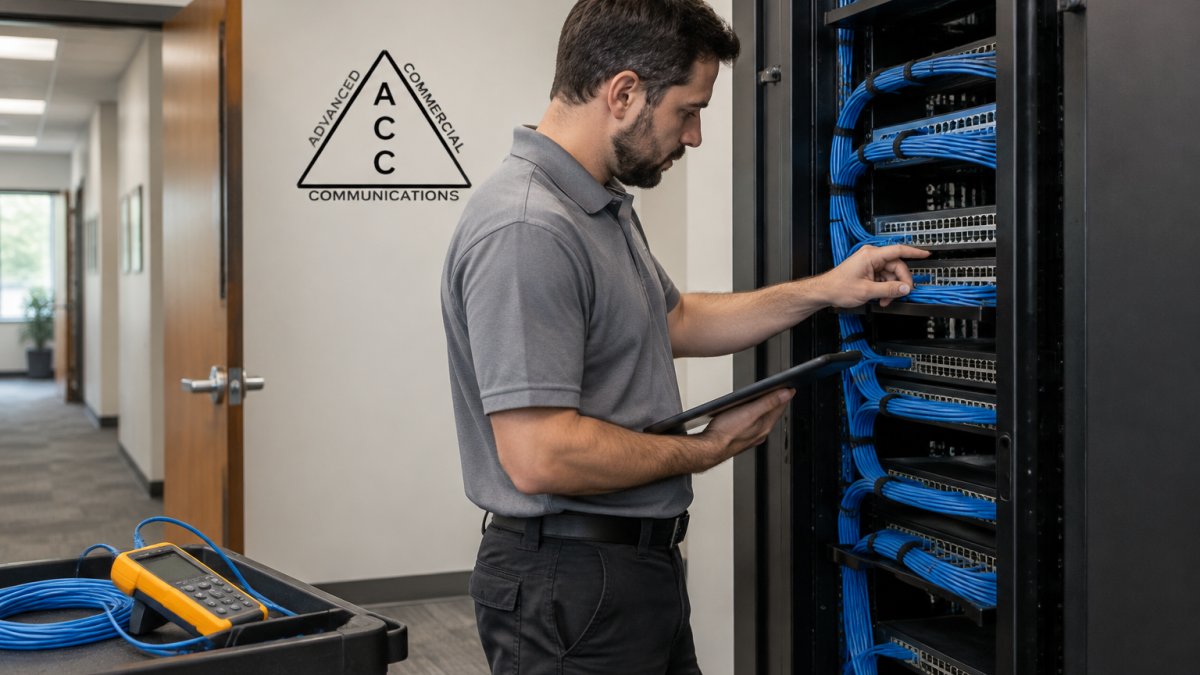
A thorough assessment reviews cabling, switches, access points, and internet circuits. It also maps how people actually use the network, since usage patterns reveal problems specs alone won’t show.
The measurements that separate a network issue from an internet issue
A useful first step in settling the “is it us or the provider?” question is to measure inside the building. These are the indicators worth capturing, and what they tend to reveal:
- Latency. Round-trip time to key destinations, measured in milliseconds. Steady low latency points away from congestion; spikes during peak hours point to a saturated link or overloaded equipment inside the building.
- Packet loss. The percentage of packets that never arrive. Even small, sustained loss degrades voice and video far more than raw speed suggests. Loss that appears only on Wi-Fi usually indicates coverage or interference problems, not an internet fault.
- Throughput versus circuit size. Compare what the internet circuit is provisioned to deliver against what users actually get at the desk. A wide gap between the two usually means the bottleneck is internal switching, cabling, or wireless, not the provider.
- Wireless coverage and signal strength. Walk the floor and record signal strength and roaming behavior room by room. Dead zones and sticky connections show up as a pattern on a floor plan, which is far more useful than a single complaint.
- Link utilization. How close switches and uplinks run to capacity during peak periods. Consistently high utilization on a backbone link is a capacity signal, not a device failure.
- Outage frequency and duration. A simple log of when connectivity fails and for how long separates scheduled congestion from genuine circuit or hardware faults.
- Hardware age and support status. Whether each switch, router, and access point is still receiving manufacturer firmware updates.
A common pattern is a business that blames its internet provider while the real constraint is an aging switch or an undersized uplink. Measuring inside the building first either confirms the provider is at fault or rules it out before anyone spends money.
A diagnostic checklist you can use today
Use this checklist to spot trouble before it spreads:
- Do video calls freeze or buffer at the same times each day?
- Do users lose Wi-Fi when moving between rooms?
- Are file transfers and page loads noticeably slower than a year ago?
- Have you added devices without expanding capacity?
- Is any network hardware past its supported life?
- Do outages recur on a schedule?
- Are firmware and software updates current?
- Has anyone reviewed your cabling since installation?
Two or more checks usually justify a professional look. The checklist tells you whether to act; the measurements above tell you what to fix first, so the upgrade budget goes to the layer actually causing the pain.
Aging Hardware, Device Growth, and Security Gaps
Aging equipment is the quiet driver behind most upgrade decisions. Routers and switches lose manufacturer support over time, which means no more firmware updates and growing security vulnerabilities.
Device growth compounds the problem. Every added camera, phone, and laptop raises network capacity requirements. A network sized for yesterday’s headcount becomes a source of daily friction.
Security is the third pressure point. Outdated equipment can’t run current protections, and gaps in monitoring leave incidents unseen.
What to Upgrade First: A Prioritized Roadmap
Start with the layer causing the most pain, then work outward. A prioritized roadmap keeps a network upgrade affordable and avoids replacing parts that still have life in them.
| Priority | What to Address | Why It Comes First |
|---|---|---|
| 1 | Cabling and backbone | Everything else depends on it |
| 2 | Switches and routing | Moves traffic between users and the internet |
| 3 | Wireless coverage | Fixes dead zones and dropped connections |
| 4 | Security and monitoring | Protects the upgraded foundation |
| 5 | Endpoint hardware | Refresh as budget allows |
Reconfigure before you replace. Sometimes the right fix is tuning an existing setup, not buying new. If you’re weighing costs, our breakdown of what drives the cost of upgrading business network infrastructure shows where your budget should go first.
How to phase the work without shutting down the business
A roadmap is also a scheduling tool. Most organizations cannot replace everything at once, so the practical question is what can be done in stages with minimal disruption. A common approach:
- Phase 1: Diagnose and stabilize. Complete the assessment, fix configuration problems, and address the single worst bottleneck. This phase often costs the least and delivers the most visible relief.
- Phase 2: Fix the foundation. Upgrade cabling and backbone links where the assessment showed a hard ceiling. This work is disruptive by nature, so it is usually scheduled around business hours or staged zone by zone.
- Phase 3: Refresh active equipment. Replace switches, routing, and access points that are out of support or undersized, aligning wireless design with the coverage map from Phase 1.
- Phase 4: Harden and monitor. Add or update security and monitoring so the upgraded network can be observed and protected going forward.
Watch out: replacing wireless access points before fixing the cabling and switching beneath them often produces disappointing results, because the new hardware inherits the same hidden ceiling.
Building the business case
Upgrade decisions usually need to survive a budget conversation, and that means translating symptoms into operational cost.
Total cost of ownership matters as much as purchase price. Supported equipment that receives firmware updates, clean and labeled cabling that shortens troubleshooting, and a design that leaves room for device growth all reduce the ongoing cost of running the network. The cheapest option today is often the most expensive to operate over the life of the system.
Schedule a Free Site Walk and Network Evaluation
The fastest way to know whether you need a network upgrade is to have someone qualified look at what you have.
Advanced Commercial Communications offers free site walks and consultations.
You can request a site walk and get a practical read on your network before committing to anything.
Your network shouldn’t make your team wait. If slow mornings, dropped calls, and dead zones have become routine, it’s time to find out why.
Frequently Asked Questions
How do I know if my business network needs upgrading?
Watch for patterns rather than one-off glitches. Repeated slow performance during peak hours, dropped video calls, Wi-Fi dead zones, and growing complaints from staff are common signs. So are frequent router reboots, aging equipment that no longer receives firmware updates, and a device count that has outgrown the original design. A business network assessment can confirm whether the cause is cabling, wireless coverage, hardware capacity, or configuration before you spend on a network upgrade.
Can outdated network cabling affect business connectivity?
Yes. Older cabling can limit throughput, fail to support faster speeds, and introduce packet loss or unstable connections that no router setting will fix. A network cabling upgrade to current standards often resolves bottlenecks that persist after hardware replacements. During a business network assessment, a technician can test cable runs and identify segments that are slowing the whole network down.
How often should a business network be evaluated?
Most organizations benefit from a review every three to five years, or sooner after a move, a major headcount increase, or a shift to cloud applications. Hardware warranties, firmware support cycles, and changing device counts all affect timing. If you are seeing recurring business network performance issues, do not wait for the calendar: schedule a business network assessment to get a clear picture of what needs attention.
What should a business consider before upgrading its network?
Start with current pain points and growth plans, then confirm which parts of the network are actually constrained. A business Wi-Fi upgrade may be enough if wired cabling tests clean; otherwise a network cabling upgrade or new switching may come first. Consider disruption to daily operations, warranty and support terms, and how the network will be monitored after installation. A free site walk with Advanced Commercial Communications can help scope the work before you commit.
