Table of Contents
- Commercial Security System Installation in Oregon: What the Process Actually Looks Like
- What Drives Commercial Security System Cost
- Business Security Camera Placement That Actually Works
- Commercial Access Control Systems: Credential Management and Integration
- Commercial Security System Maintenance and Ongoing Support
- Oregon Licensing, Permits, and Code Requirements for Security Installation
- Frequently Asked Questions
Last Updated: October 12, 2026
Commercial Security System Installation in Oregon: What the Process Actually Looks Like
A commercial security system installation in Oregon is the end-to-end process of assessing a property, designing a layered system, installing the hardware, and proving it works before handover. It is not a single-day job. It is a project with six distinct phases, and skipping any one of them is how businesses end up with cameras that record nothing useful and alarms that nobody trusts.
At Advanced Commercial Communications, we run free site walks and consultations across the state. We often see businesses buy hardware first and plan second, which can lead to issues.
Below, we break down exactly what each phase involves, what drives cost, and what Oregon law requires before you sign anything. The 6-phase process we cover is a comprehensive approach used for projects of varying scales.
The single most important decision in any security project is the site walkthrough. A system designed from a floor plan alone will miss blind spots, dead zones, and cable pathways that change the entire budget.
From Site Walkthrough to System Design
A site walkthrough is a physical inspection of your business premises where we map entry points, camera sightlines, cable pathways, power availability, and existing network infrastructure. It takes one to three hours for most commercial properties.
From there, system design turns those findings into a documented plan: device locations, camera models, access control points, and a network topology that can carry the load.
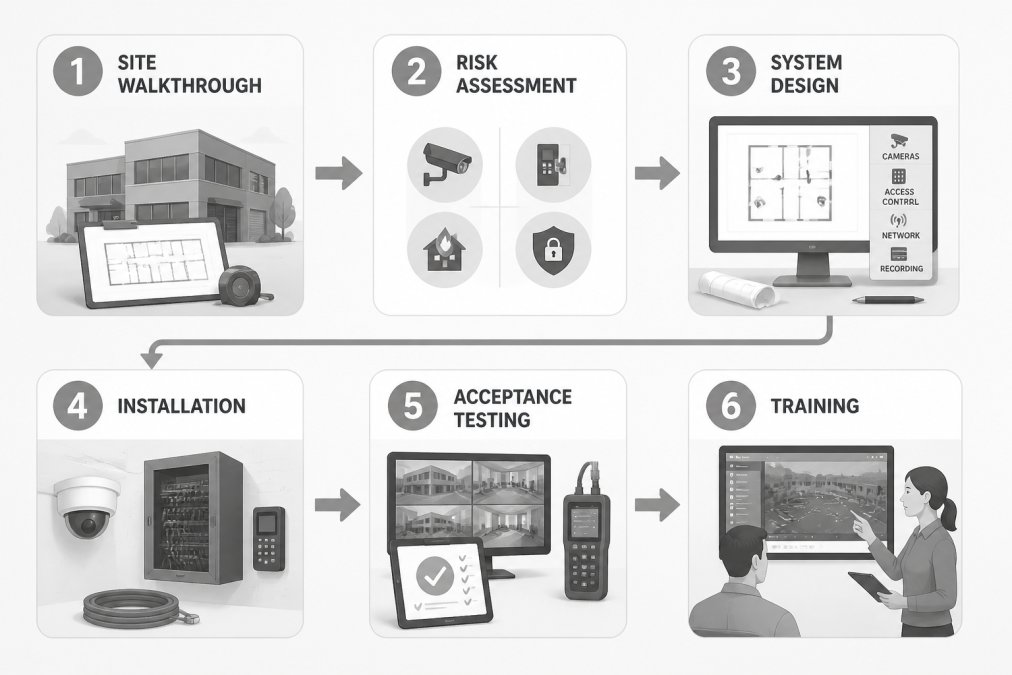
Here is what the full sequence looks like:
| Phase | What Happens | Typical Duration |
|---|---|---|
| Site walkthrough | Physical inspection, photo documentation | 1-3 hours |
| Risk assessment | Identify threat points, coverage gaps | 1-2 days |
| System design | Device schedule, network plan, quote | 3-10 days |
| Installation | Cabling, mounting, configuration | 1-5 days |
| Acceptance testing | Verify every device, test failover | 2-6 hours |
| Training and handover | Admin training, documentation | 1-2 hours |
Commercial projects typically move from signed proposal to live system within a timeframe that depends on factors such as hardware lead times.
What Drives Commercial Security System Cost
Commercial security system cost is driven by four factors: the number of devices, the complexity of the cable runs, whether existing infrastructure can be reused, and the level of monitoring you choose. Pricing depends on quantity, site conditions, and hardware selection, so we quote every project individually after a walkthrough rather than publishing a flat rate.
Cabling can be a significant cost factor. For example, a camera on an exterior wall a distance from the nearest network switch may require a fiber run, a media converter, and conduit, which can add to the overall cost. In retrofit projects, cabling and labor can sometimes exceed the hardware line item.
To assist with budgeting, here is how major line items can break down. These figures are planning estimates, not quotes, actual pricing depends on site conditions, hardware tier, and labor access.
| Cost driver | What moves the number | Planning range (per unit) |
|---|---|---|
| IP camera (hardware) | Resolution, IR range, vandal rating, analytics | |
| Camera installation labor | Mounting height, lift rental, drywall vs. masonry | |
| Structured cabling | Cable type (Cat6 vs. fiber), run length, conduit | |
| Access control reader + controller | Credential type, door hardware, power | |
| Alarm panel and sensors | Zone count, sensor type, wireless vs. hardwired | |
| Network switch / PoE budget | Port count, PoE wattage, managed vs. unmanaged | |
| Monitoring (recurring) | Central station, video verification, response tier | |
| Service agreement (recurring) | Visit frequency, response SLA, parts coverage |
Three mechanics that separate a realistic budget from a low bid:
- One-time vs. recurring. Hardware, cabling, and installation are one-time. Monitoring and preventive maintenance are recurring. A low install bid with a high monitoring contract can cost more over five years than a higher install bid with a modest monitoring plan.
- Retrofit vs. new construction. In new construction, cabling can be pulled before drywall, cutting labor dramatically. In a finished building, every run may require fishing, patching, and paint.
- Integration scope. Tying access control to video so a badge swipe triggers the nearest camera and logs footage against that event requires configuration labor, not just hardware. Budget for it explicitly.
A common mistake is buying cameras before confirming network capacity. For instance, a high-resolution camera system can saturate a network switch, potentially requiring new switches, new cabling, or both.
If you want a real number for your facility, the only reliable path is a free site walk and a written proposal that itemizes hardware, labor, cabling, and recurring costs separately so you can compare bids apples to apples.
Business Security Camera Placement That Actually Works
Business security camera placement should prioritize identification over coverage. A camera that captures a wide shot of a parking lot is far less useful than one positioned to capture a face at the point of entry.
Three placement rules we apply on every job:
- Cover every entry and exit at face height, angled slightly downward to reduce glare and backlighting.
- Overlap fields of view so no single camera failure creates a blind spot.
- Cover the cash or asset path, not just the room. Follow the route someone would take from entry to valuables.
Lighting is a crucial factor. For example, a camera facing a west-facing window at certain times can produce a silhouette, impacting its effectiveness. Placement decisions should account for sun angle, not just floor plan geometry.
Commercial Access Control Systems: Credential Management and Integration
Commercial access control systems manage who can enter which door, when, and under what conditions. Modern systems use credential management to issue, revoke, and audit access from a single dashboard.
The integration question matters more than the hardware. Access control should tie into your video surveillance so a badge swipe triggers the nearest camera and logs footage against that event. It should also connect to your network infrastructure, because a door controller that loses network connectivity can lock out staff or fail open.
We deploy access control solutions that can integrate with structured cabling and fiber, allowing for a coordinated plan for door hardware, readers, and network.
Commercial Security System Maintenance and Ongoing Support
Commercial security system maintenance is the scheduled work that keeps cameras recording, alarms reporting, and access logs accurate. Without it, systems degrade quietly.
A preventive maintenance visit typically covers:
- Cleaning camera domes and lenses
- Verifying recording continuity and storage health
- Testing alarm triggers and notification paths
- Checking backup battery health
- Reviewing access control logs for anomalies
- Confirming firmware is current and patched
Cybersecurity belongs on that list. Any camera or door controller on your network is a potential entry point, and default passwords are the most common vulnerability. Change them at install, segment security devices onto their own VLAN, and patch on a schedule.
Oregon Licensing, Permits, and Code Requirements for Security Installation
Oregon regulates low-voltage alarm and security work through a state licensing framework, and electrical permits may be required depending on the scope of the work. Because requirements vary by jurisdiction and by project type, confirm the current rules with the Oregon Building Codes Division and your local permitting authority before work begins.
Here is what that means in practice, phase by phase.
Licensing. Alarm system installation falls under Oregon’s low-voltage licensing framework. Ask any installer for their license number before signing, and verify it is current. A licensed low-voltage contractor carries the bond and insurance that protect you if a technician damages wiring or a device fails. Working with unlicensed individuals for security installations can lead to failed inspections and voided warranties.
Permits. Whether you need an electrical permit depends on the scope. Adding devices to an existing low-voltage circuit is often permit-exempt, while new circuits, new panel work, or work that ties into building power typically requires a permit and inspection. The permit is usually pulled by the licensed contractor, not the business owner. Confirm who is pulling it in writing before work starts.
Fire alarm and life-safety separation. Fire alarm and life-safety system work is governed separately from security work. Mixing the two scopes on one permit is a common source of delays, because the fire alarm scope triggers different code sections, different inspection checkpoints, and often a different licensed trade. If your project touches both, plan for two scopes and two sign-offs.
Code and standards that apply. Commercial security installations are typically designed to align with NFPA 731 (Standard for the Installation of Premises Security Systems) and, where fire alarm is involved, NFPA 72 (National Fire Alarm and Signaling Code). Access control on egress doors must not conflict with life-safety egress requirements, a door that fails locked during a fire is a code violation and a liability. Verify the adopted code edition with your local authority having jurisdiction (AHJ), since adoption varies by city and county.
Cybersecurity and insurance. For facilities with connected cameras and access control, cybersecurity expectations increasingly appear in insurance and compliance reviews. Document your network segmentation and password policy as part of closeout. A written record that security devices sit on a separate VLAN, that default passwords were changed at install, and that firmware is patched on a schedule is the kind of evidence an underwriter or auditor may ask for.
Before you sign anything, get three things in writing: the installer’s license number, who is pulling the permit, and whether fire alarm scope is included or separate. Those three answers prevent most compliance surprises.
Frequently Asked Questions
What does a commercial security system installation include?
A full installation covers a site walkthrough and risk assessment, system design, and the physical work of running cable, mounting cameras, installing access control readers, and setting up alarm panels. It also includes configuration of monitoring connections, acceptance testing to confirm every device works, and staff training on daily operation. For Oregon businesses, the process should also account for state licensing and local permit requirements before any equipment goes on the wall.
How much does it cost to install a commercial security system?
Commercial security system cost depends on several factors: the number of cameras and their resolution, whether you need access control or fire alarm integration, the size and layout of your building, and whether existing cabling can be reused. A single-entry retail space needs far less infrastructure than a multi-building campus. Pricing also varies by monitoring contract terms and whether you choose managed services. For an accurate figure, request a site walkthrough and written quote based on your specific facility.
How many security cameras does a commercial building need?
Camera count depends on coverage goals, not square footage alone. Start by identifying critical zones: entry and exit points, cash handling areas, loading docks, parking lots, and hallways leading to restricted spaces. Each zone may need one or more cameras depending on sight lines and lighting. A 5,000-square-foot office might need six to ten cameras, while a warehouse with multiple dock doors could need twenty or more. A site walkthrough is the only way to get an accurate count.
What maintenance does a commercial security system need?
Commercial security system maintenance includes checking camera focus and field of view, cleaning lenses, testing alarm sensors and motion detectors, verifying access control reader function, confirming backup battery health, and reviewing recorded footage quality. Firmware updates for cameras and network video recorders should happen on a schedule. Most systems benefit from a preventive maintenance visit once or twice a year, plus prompt repair when a device fails. Regular maintenance catches small issues before they become coverage gaps.
Most businesses underestimate how much planning a reliable security system requires. Advanced Commercial Communications is a veteran-owned, Oregon-based team that handles the whole project, from structured cabling and fiber to security camera systems, access control, and managed IT support after handover. We start with a free site walk so your quote reflects your actual facility, not a guess. Talk to an expert and get a system designed around your building.